Make maps of real places in ChatGPT and Claude
Updated 23 October 2026
To make a map in ChatGPT or Claude, add the Ultimaps MCP server by its URL, https://api.ultimaps.com/mcp, then ask for a map. It draws countries, states, counties and US ZIP code areas from real boundary data and returns a finished map with a legend. You don't need an account, a sign-in or an API key.
The map shows up in the conversation with a button that opens it in Ultimaps Studio, the full map editor. There you can edit it by hand, export it, or publish it as an interactive map to share or embed.
https://api.ultimaps.com/mcpAsk for a map
What you can make
Paste a list or a table into the chat, say which map you want, and you get a map back. Labels such as rep names or “Available / Limited / Sold out” become a category map, with your labels in the legend. Numbers become a choropleth, with color breaks picked from the data.
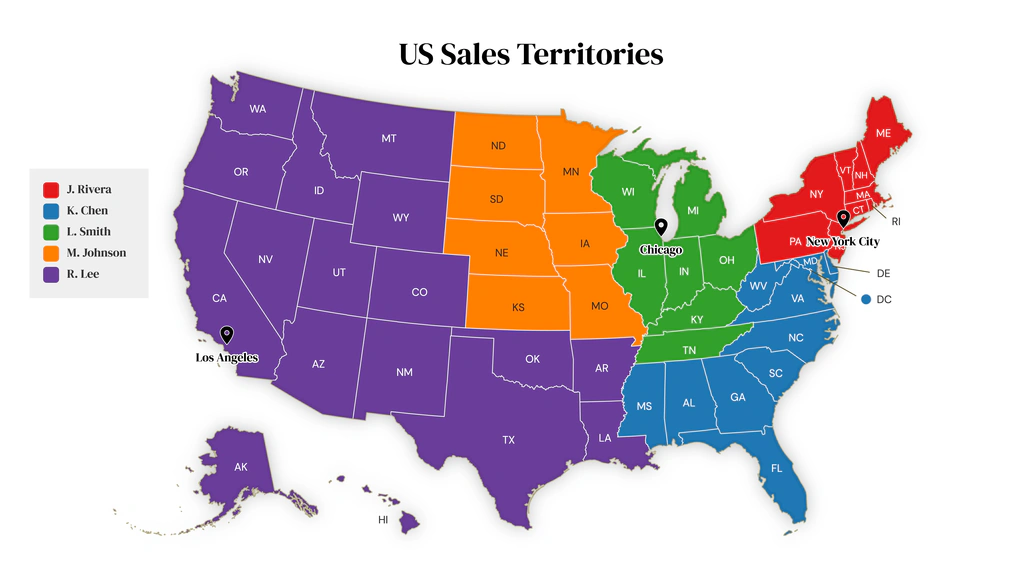
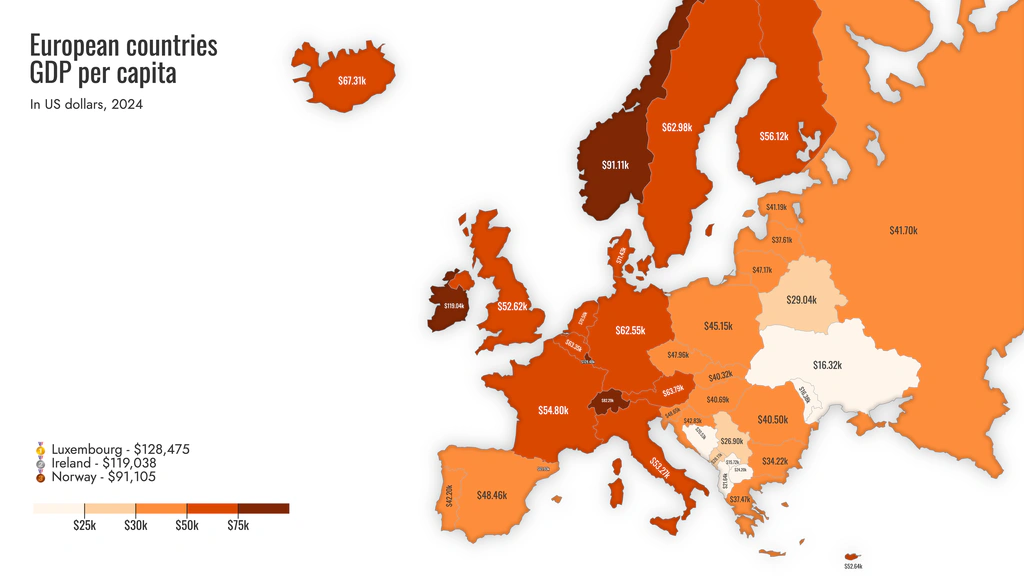
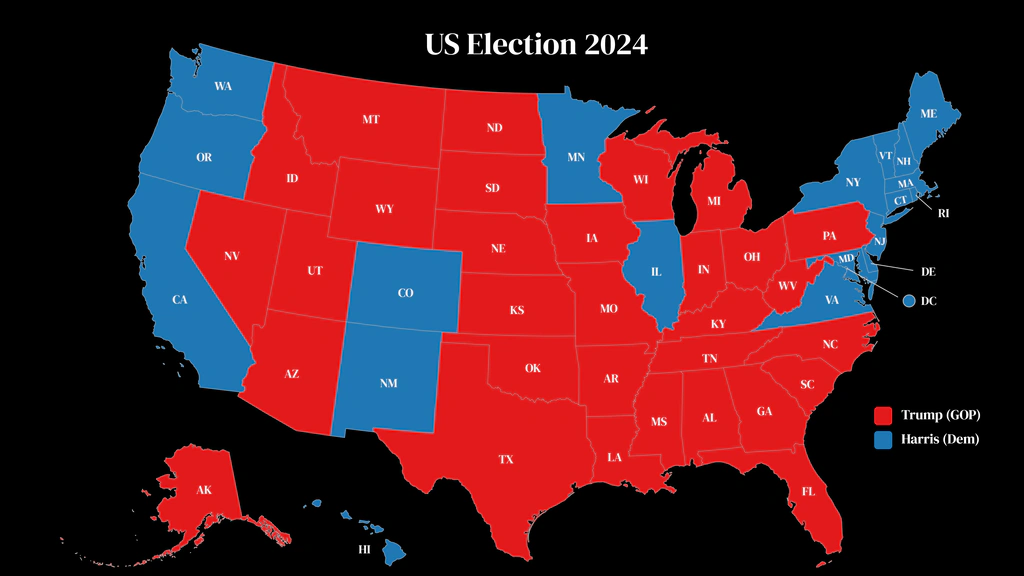
- Sales territories. Color a state's counties by rep, label every county and show open territory in gray.
- Service areas. Shade the counties you serve as core, extended or opening soon, and pin your offices.
- Status maps. Show which states are available, limited or sold out for franchises, dealers or programs.
- Footprints. Color the countries where you have offices, distributors or planned launches.
- Data maps. Turn a table of numbers per state or country into a choropleth, with each value printed on the map.
- Outline maps. A clean map of a country, state or county set with names, ready to color or print.
Every map can have a title, a legend with its own heading, region labels (names, values or both), pins and one of 10 themes. Region names are matched even with typos or as codes (US-CA, California and CA all work), and anything that doesn't match is reported back, so nothing is dropped silently.
Coverage. More than 180 base maps: the world, every continent, the states and provinces of major countries, the counties of every US state, and US ZIP code areas. ZIP areas are Census ZCTAs, which approximate USPS ZIP codes but are not identical to them. See every map id on the map list.
Every border comes from real geographic boundary data, not from an AI image model, so the regions are where they really are and the same request gives the same map.
Keep going in Ultimaps Studio. Each map comes with an edit link. Open it to recolor regions by hand, move labels or change the legend, export the map for slides and print, or publish it as an interactive map with tooltips to share by link or embed on a website. Publishing needs a free Ultimaps account.
Add Ultimaps to Claude
Ultimaps gives Claude a tool that draws maps of real places: countries, states, counties and US ZIP code areas, colored by your data or by category, with a legend, a title and pins. You add it by URL as a custom connector. There is nothing to install and no sign-in.
In claude.ai and the Claude desktop app
- Go to Customize > Connectors.
- Click Add custom connector.
- Name it
Ultimapsand enter the server URL:https://api.ultimaps.com/mcp - If the dialog asks for authentication, choose No sign-in. Leave the OAuth fields empty.
- Click Add.
- In a chat, click +, open Connectors and make sure Ultimaps is on.
The Free plan allows one custom connector. On a Team or Enterprise plan, an Owner adds the connector under Organization settings > Connectors (Add, then Custom), and members then find it under Customize > Connectors. Claude's own guide: Add a connector that isn't in the directory.
First prompt to try
Color Ohio counties by sales rep. Lucas, Wood and Hancock are Maya, and Cuyahoga, Summit and Stark are Sam. Label every county.
What you get back. The map appears in the conversation in an Ultimaps card, with the matching notes, an Edit in Ultimaps Studio button and an Open image button. Claude also gets a short report: which region names were auto-corrected, which didn't match, and the color plan it used, so it can fix a miss on the next try. Ask for changes in plain words (“make Summit Maya's too and add a title”) and Claude renders the map again. Claude may ask you to allow the tool before the first render.
Then, in Studio. Click Edit in Ultimaps Studio to open the same map in the editor. Edit it by hand, export it, or publish it as an interactive map to share or embed. Publishing needs a free account.
Limits. PNG up to 1600 px wide with a small Ultimaps credit, up to 30 maps an hour (5 a minute) per conversation. Each image link is public to anyone who has it and expires after 30 days. Details in Limits, privacy and API keys.
In Claude Code
One command adds the hosted server. The second form sends an API key for your plan's quota and output.
claude mcp add --transport http ultimaps https://api.ultimaps.com/mcp
# with a key:
claude mcp add --transport http ultimaps https://api.ultimaps.com/mcp \
  --header "Authorization: Bearer um_live_…"
Claude Desktop, running on your computer
You can also run the server on your own computer with the @ultimaps/mcp package (Node.js 20 or newer). Requests then come from your own IP address, and every image is also saved to a file you can open. Download ultimaps-<version>.mcpb from the latest release and open it to install it in one click, or add this to claude_desktop_config.json.
{
  "mcpServers": {
    "ultimaps": {
      "command": "npx",
      "args": ["-y", "@ultimaps/mcp"],
      "env": { "ULTIMAPS_API_KEY": "" }
    }
  }
}
Leave ULTIMAPS_API_KEY empty for the keyless tier, or fill it in for your plan's quota and output.
Add Ultimaps to ChatGPT
Ultimaps gives ChatGPT a tool that draws maps of real places: countries, states, counties and US ZIP code areas, colored by your data or by category, with a legend, a title and pins. You add it by URL as a custom MCP server in developer mode. There is nothing to install and no sign-in.
Developer mode and custom MCP servers depend on your ChatGPT plan and workspace settings. OpenAI's help article Developer mode and MCP apps in ChatGPT lists who can use them and where to turn developer mode on.
- Turn on Developer mode in ChatGPT's settings, as OpenAI's article describes.
- Go to ChatGPT Plugins, select the + button, then Add custom MCP server.
- Name it
Ultimapsand, under Connection, enter the URL:https://api.ultimaps.com/mcp - For authentication, choose no authentication. Ultimaps doesn't need an account or OAuth.
- Review the warning, select I understand and want to continue, then Create as a plugin.
- Start a new conversation, type @ in the prompt box and select Ultimaps. Turn it on in each conversation where you want maps.
OpenAI's own steps: Connect and test your plugin.
First prompt to try
Map population in millions: Brazil 212, Colombia 53, Argentina 46, Peru 34, Venezuela 28, Chile 20. Show values on the map.
What you get back. The map appears in the conversation in an Ultimaps card, with the matching notes, an Edit in Ultimaps Studio button and an Open image button. ChatGPT also gets a short report: which region names were auto-corrected, which didn't match, and the color plan it used, so it can fix a miss on the next try. Ask for changes in plain words (“make Chile its own color and add a title”) and ChatGPT renders the map again. ChatGPT may ask you to allow the tool before the first render.
Then, in Studio. Click Edit in Ultimaps Studio to open the same map in the editor. Edit it by hand, export it, or publish it as an interactive map to share or embed. Publishing needs a free account.
Limits. PNG up to 1600 px wide with a small Ultimaps credit, up to 30 maps an hour (5 a minute) per conversation. Each image link is public to anyone who has it and expires after 30 days. Details in Limits, privacy and API keys.
Using Codex? It runs the package on your computer. See Claude Code and Codex.
Cursor, VS Code and other MCP clients
Any client that connects to remote MCP servers takes the same URL, https://api.ultimaps.com/mcp. Clients with a config file take the URL alone. This is Cursor's mcp.json.
{
  "mcpServers": {
    "ultimaps": { "url": "https://api.ultimaps.com/mcp" }
  }
}
If your client can send headers, add Authorization: Bearer <key> for your plan's quota and output. For VS Code, Windsurf and other clients, see the install notes for every client.
Run it on your computer
@ultimaps/mcp runs the same three tools locally over stdio. Requests come from your own IP address, and every image is also saved to a file you can open. It needs Node.js 20 or newer.
Claude Code and Codex
claude mcp add ultimaps -- npx -y @ultimaps/mcp
codex mcp add ultimaps -- npx -y @ultimaps/mcp
Clients that read a config file (Claude Desktop, Cursor, VS Code) take the same command and arguments. The claude_desktop_config.json version is in Claude Desktop, running on your computer. Without a key, the local package uses the keyless tier: PNG up to 1600 px with attribution, 30 renders an hour. Set ULTIMAPS_API_KEY for your plan's quota and output.
Tools
The server has three tools. You don't call them yourself: your assistant picks them from your request.
| Tool | What it does |
|---|---|
render_map | Draws the map: a choropleth (numbers), categories (labels) or explicit colors, plus pins, a title, a legend, region labels, a theme and extra layers. Returns the image, an image link, an edit link into Ultimaps Studio and a report of corrections and unmatched names. |
list_maps | Lists the base maps, searchable by name or region type ("counties", "germany"). |
get_map_regions | Lists one map's region keys and names, 200 per page. |
list_maps and get_map_regions only read the catalog. render_map stores each rendered image at a link, which is why your assistant may ask before running it. Under the tools is the map image API, and the full request format is in the API reference and as a plain function-calling definition.
Example prompts
Each prompt carries its own data, so the first map is right without the assistant looking anything up. Copy one into a chat with Ultimaps turned on.
Sales territories
Color Ohio counties by sales rep. Lucas, Wood and Hancock are Maya, and Cuyahoga, Summit and Stark are Sam. Label every county.
Service areas
Shade the Pennsylvania counties we serve: Allegheny, Butler, Beaver and Washington are core, Westmoreland and Armstrong are extended. Pin our Pittsburgh office.
Status map
Make a franchise status map of US states: Texas, Florida and Ohio are available, Georgia and Arizona are limited, California and New York are sold out. Title it "Franchise availability".
Footprint
World map of our footprint: offices in the US, UK and Germany, distributors in Brazil, Japan and Australia, launching in Mexico and India in 2027. Use the dark theme.
Data map
Map population in millions: Brazil 212, Colombia 53, Argentina 46, Peru 34, Venezuela 28, Chile 20. Show values on the map.
ZIP codes
Highlight these ZIP codes on a map of Colorado: 80202, 80203, 80205, 80206, 80218.
For more on territory maps, see sales territory mapping. For ZIP maps without a chat, see ZIP code maps.
Limits, privacy and API keys
Without a key (ChatGPT, claude.ai and any client that can't send headers)
- PNG up to 1600 px wide, with a small Ultimaps credit on the image.
- Up to 30 maps an hour and 5 a minute per conversation. Dry runs count.
- SVG and PDF aren't returned in chat. Export them from Ultimaps Studio through the edit link.
With a key. Clients that can send headers, such as Claude Code, take Authorization: Bearer <key> and get your plan's quota and output. Keys are created in Studio under Workspace > API, and the map image API page lists each plan's limits.
Pricing. The server, the keyless tier and Studio editing are free. Ultimaps Pro removes the credit and adds high-resolution PNG, SVG and PDF export, and a one-time purchase removes the credit from a single map.
Image and edit links. Every map comes with an image link that can't be guessed. Anyone who has the link can open the image, and the file is deleted after 30 days. The edit link rebuilds the map in Studio from the stored request for 30 days. Keep figures you don't want shared out of maps you make this way.
What it doesn't do
- Street maps, neighborhoods, satellite imagery, routing or directions.
- Custom or hand-drawn boundaries, or two base maps in one image.
- Address lookup. Pins are placed by latitude and longitude, which your assistant can supply for well-known places.
- Fictional places. It draws only real geography.
Privacy. Each render request is logged with its content, which is deleted after 30 days. The IP address and user agent are deleted after 90 days. On the hosted server, the IP address is usually your AI provider's server, and the conversation identifier the assistant sends is kept only as a hash, in memory, to share rate limits fairly. Ultimaps doesn't sell this data or use it for advertising. What your assistant stores is governed by its own privacy policy. Full details: privacy policy, Ultimaps API and MCP Server section. Terms: terms of service.
Support. Email [email protected] and include the render id from the map's result.